Flip a House Getting Started Guide
Your first day from messy starter house to BIG MONEY sale.
What you are getting into
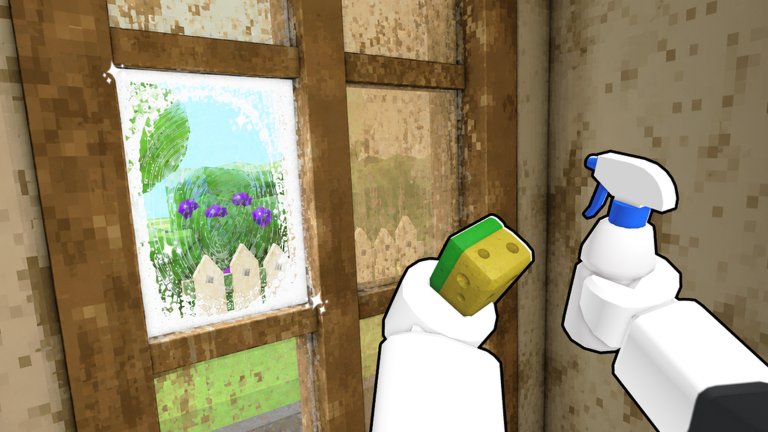
Flip a House! by Increates House is a Roblox simulation / incremental game released around mid-July 2026. You enter messy properties, clear trash, vacuum and scrub surfaces, place furniture to raise the listing price, then sell for BIG MONEY. Profit buys better tools so the next house flips faster. The experience supports co-op with up to four friends, and it has already crossed roughly a million visits — so you will rarely be alone in a server.
This getting-started guide is the day-one path: join correctly, grab the free-money social rewards, complete your first full loop, and know what to unlock next. When you want advanced routing, jump to Make Money Fast, Cleaning Tips, and Furniture & Selling.
Step 0 — Launch the right experience
- Open the official Flip a House! place on Roblox (developer: Increates House).
- Use a stable server — if teleport fails, retry rather than joining a random similarly named cleaning game.
- Let the HUD finish loading so tools and cash counters are visible before you sprint into rooms.
Bookmark this wiki’s Guides Hub and the Links Hub so you can return after sessions.
Step 1 — Claim free money (Like + Join Group)
Before you obsess over furniture catalogs, take sixty seconds for the built-in social reward:
- Like the Flip a House! game page.
- Join the Roblox group Increates House.
- Rejoin the experience so the free-money grant can apply cleanly.
That cash is the best risk-free head start in the game right now. Promo codes are a different story: as of September 2026 there are no verified public codes — details live on the Codes Hub. When codes appear, redeem them with How to Redeem Codes. Never download an “auto redeem script”; see the Scripts Hub for why.
Step 2 — Understand the core loop
Every successful Flip a House run follows the same spine:
- Clear trash — pick up / remove junk so rooms are workable.
- Vacuum & scrub — clean floors, stains, and surfaces that still tank value.
- Furnish — place furniture that raises the projected sale price.
- Sell — cash out when the price curve flattens.
- Upgrade gear — buy better cleaning tools, then tackle bigger houses.
Do not skip cleaning to rush furniture on your first house. Dirty rooms waste money you place and train bad habits before co-op. The embedded gameplay video on this page shows the fantasy in motion — watch how players move from mess to sellable home, then mirror that pacing in your own server.
Step 3 — Your first house checklist
Clear the clutter first
Walk the property once without buying anything. Mentally mark:
- High-trash rooms (kitchens, living rooms, garages)
- Narrow halls where junk blocks pathing
- Outdoor piles you might forget until sell time
Clear trash in a circle route so you rarely backtrack. Deep technique lives in Cleaning Tips.
Vacuum and scrub with purpose
After junk is gone, switch to vacuum / scrub tools. Prioritize:
- Floors buyers “see” first (entry, living room)
- Kitchens and bathrooms (stains feel expensive)
- Bedrooms and low-traffic corners last
If your starter tool feels slow, that is normal — your first profits should fix that.
Furnish for value, not vibes (yet)
Open the furniture options and place pieces that move the price meter. On house one:
- Fill empty hero rooms before decorating closets
- Avoid spending your entire Like/Group cash on a single luxury item
- Watch the price readout after each major placement so you learn what actually matters
When the meter barely moves after several purchases, you are ready to sell. Full sell timing advice: Furniture & Selling.
Sell and breathe
Hit the sell flow, collect BIG MONEY, and resist immediately buying the biggest house on the board. Bank enough for the next cleaning upgrade first.
Step 4 — Early gear unlocks (what to buy first)
Think in ROI, not rarity glow:
- Faster trash clear / vacuum / scrub tools — time saved on every future house.
- Quality-of-life movement or capacity upgrades if the shop offers them — less walking between piles.
- Furniture budget reserved for the next flip’s value pieces.
- Cosmetics last — they feel great, but they do not shorten the loop.
Cross-check priorities on the Tier List Hub as rankings go live. Until then, any upgrade that visibly shortens clean time beats a couch you cannot afford to place efficiently.
Step 5 — Second and third flips
Your second house should feel faster because tools improved. Goals:
- Repeat the same room order so muscle memory forms
- Note which furniture categories bumped price hardest last time
- Stop furnishing earlier if the price curve flattens — over-investing is the classic beginner trap covered in Make Money Fast
By house three, you should know whether you prefer solo flow or inviting friends.
Step 6 — Bring friends (optional but strong)
Flip a House! supports up to four players. Even one teammate changes the game:
- One player clears trash while another starts vacuuming finished rooms
- A third player can stage furniture once spaces are clean
- Call outs prevent two people buying the same upgrade
Read the full Co-op Guide before your first crowded flip so roles stay clear.
Controls & session habits (practical)
Exact keybinds can vary with Roblox device settings, but good habits transfer everywhere:
- Keep the cash and price UI visible while furnishing
- Finish a room’s trash before vacuuming it — dirty + decorated is wasted motion
- Rejoin if tools desync after a long session
- Take a two-minute break between big houses so you do not mis-click sell
On mobile, landscape mode makes shop and sell buttons easier to hit accurately.
Common beginner mistakes
- Ignoring Like + Join Group and struggling through house one broke.
- Buying a bigger house too early before cleaning tools catch up.
- Decorating filthy rooms and wondering why the sale feels weak.
- Chasing fake codes or scripts instead of playing the loop (Codes Hub, Scripts Hub).
- No sell discipline — spending every dollar of furniture budget when the price already plateaued.
- Silent co-op — four players in one doorway fighting over the same trash pile.
What to read next
| Goal | Page |
|---|---|
| Faster cash per minute | Make Money Fast |
| Cleaner routing | Cleaning Tips |
| Price & sell timing | Furniture & Selling |
| 2–4 player roles | Co-op Guide |
| Promo / free money status | Codes Hub |
| All tutorials | Guides Hub |
Day-one success definition
You “got” Flip a House! when you can:
- Claim social free money without confusion
- Finish one clean → furnish → sell cycle without getting stuck
- Name the next tool you will buy and why
- Decide whether tonight’s session is solo or co-op
Do that, and every later guide on this wiki compounds instead of confusing you. Welcome to the flip life — now go make that first BIG MONEY sale.
Frequently Asked Questions
Quick answers for Flip a House players.
Is Flip a House! free to play on Roblox?
Yes. It is a Roblox experience by Increates House. Optional purchases may exist in the shop, but the core clean → furnish → sell loop is playable for free.
How do I get free money as a new player?
Like the game page and join the Increates House group, then rejoin the experience. Check the Codes Hub for promo codes — none were verified as of September 2026.
What should I buy first after my first sale?
Prioritize cleaning tool upgrades that shorten trash, vacuum, and scrub time before spending heavily on cosmetics or the largest house tier.
Can I play with friends on day one?
Yes. Flip a House! supports co-op with up to four players. Read the Co-op Guide for role splits so your first multiplayer flip stays organized.
Where can I watch real gameplay?
This page embeds a Flip a House! gameplay video tied to the real place. Use it to preview pacing, then practice the same loop in your own server.